Short guide for working with Ray
This section describes how to work with Ray. Specifically, we will discuss how to do distributed computing with the Ray library use the C++ API.
Note
Ray is a Python library aiming at facilitating distributed computing of Python programs. It exposes an API that can be used by C++ programs however, at the time of writing, this API is not as mature as the Python counterpart.
Install Ray
Ray is a Python library that exposes a C++ API. Thus, you can use pip in order to install it
on your system:
pip install ray
See the official Installing Ray page for more options. However, in our case we want to install Ray alongside its C++ API so install it using:
pip install -U ray[cpp]
Assuming that everything has worked fine, let’s generate a project template. This is what we will be using throughout this tutorial.
ray cpp --generate-bazel-project-template-to ray-template
The command above will create a directory called ray-template with the following structure
BUILD.bazel
example.cc
run.sh
thirdparty
WORKSPACE
Let’s now review the core componets of Ray. You can find more information at Overview of Ray.
Ray core components
Ray consists of a number of libraries. These are:
Ray core
Ray AIR
Ray cluster
Schematically these are shown in the image below
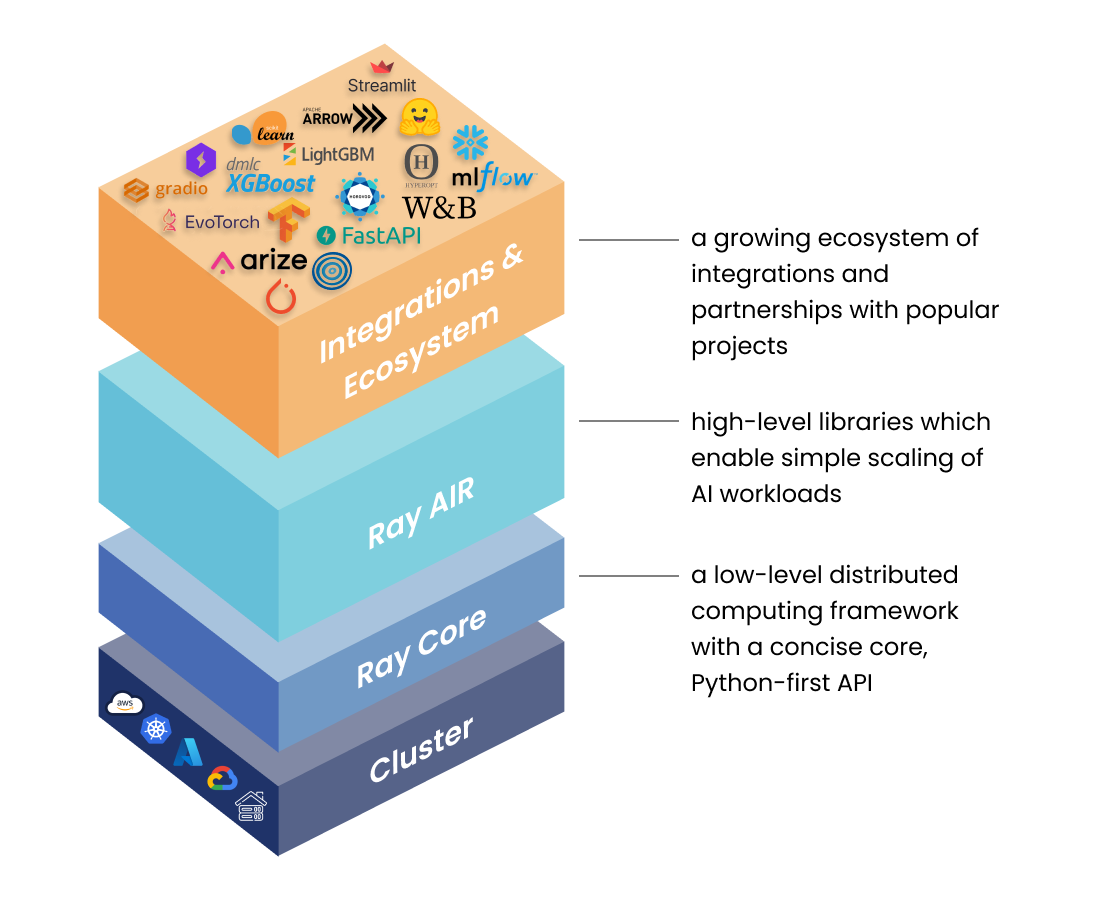
Stack of Ray libraries. Image from [1].
Ray core
Ray core is a rather low-level distributed computing framework. Its main key abstractions are
With Ray we can execute arbitrary functions on separate workers. These are called remote functions and asynchronously invocing such a remote function is called a Task.
A Ray task is just a function that is executed asynchronously. A function cannot hold any state and this sometimes may be problematic. If our application requires stateful computing, we will have to use another Ray core abstraction namely an Actor. A Ray Actor is essentially a worker that can hold state. Every time we create a new actor a new worker will be created. The methods of the actor are scheduled on that specific worker and can access and mutate the state of that worker.
See example Using Ray core Tasks, Actors and Objects about how to use these abstractions in C++.
In Ray, tasks and actors create and compute on objects. We refer to these objects as remote objects because they can be stored anywhere in a Ray cluster, and we use object refs to refer to them. Remote objects are cached in Ray’s distributed shared-memory object store, and there is one object store per node in the cluster. In the cluster setting, a remote object can live on one or many nodes, independent of who holds the object ref(s).